ytty is a native macOS terminal workspace for keeping parallel coding-agent sessions visible and navigable.
A terminal pane used to be a place where we acted. With coding agents, it can also be a place where something else is acting on our behalf while we are elsewhere.
That changes the rhythm of terminal work. These sessions are not just one-off commands or background processes. They are ongoing loops we need to return to: read, steer, answer, review, send back out.
The question became less about how many panes we could fit on screen, and more about how the space should support the movements of our attention: expanding to see what is happening at a glance, moving between threads, noticing what asks us to come back, or zooming into a single session when it is time to focus.
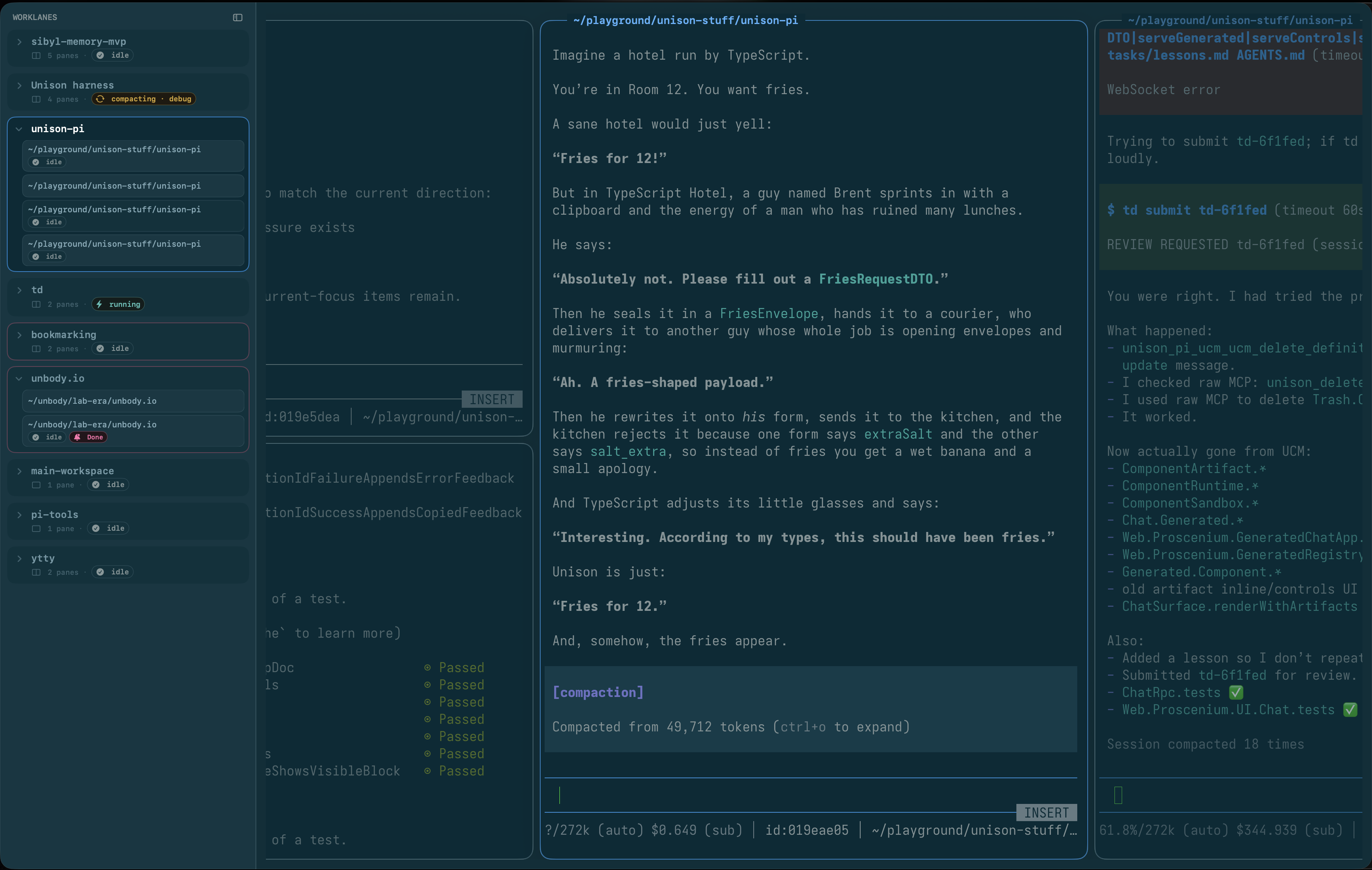
Tracks give the workspace a wider shape: projects on the left, panes spreading horizontally, and state cues that make unfinished work easier to find again.
Tracks
Tracks are how ytty gives parallel work a wider shape. A track is a horizontally scrollable group of terminal panes, usually a project or thread of work. It is close to a tab, except it can hold a wider working context instead of a single session.
Most of the time we use one track per project. But tracks are intentionally loose: a task, a set of agents, a debugging thread, whatever helps related panes stay together.
Attention engineering
Parallel agents create a lot of tiny bookkeeping.
Is this still running? Did it finish? Is it waiting for us? Can we ignore it for another ten minutes, or should we step back in?
Designing for that means deciding what can stay quiet, what should remain visible, what needs a way to call us back, and what should disappear when we are focused.
We have started thinking of this as attention engineering. Not in the engagement sense. Almost the opposite: placing signals at the right intensity so the workspace carries more of the bookkeeping without hijacking our attention.
In ytty, that becomes pane and track state: idle, running, done, waiting, error, collapsed.
A control socket makes that state scriptable from the outside, so tools like pi, Claude Code, or Codex can update the workspace directly.
Built around Ghostty
ytty is built around libghostty.
Ghostty is already a great terminal, and libghostty lets us use it as the foundation for a different kind of shell around it.
The panes still feel like Ghostty. They respect the same config and color scheme. ytty adds the layer around them: tracks, keyboard navigation, pane state, external control, and focus modes.
Status
We use ytty every day, and we will open source it soon. If you want a look before then, just ask.